
Hire a Technical SEO Expert Who Finds What Tools Can't See
I don't run a crawl and hand you a spreadsheet of errors. I identify the architectural failures, crawlability blockers, and indexation issues that actually suppress your rankings. I deliver a prioritized roadmap and developer-ready tickets your team can act on immediately.
Client results
DeepLogic: multi-brand audit
Job platform: 500k → 50k
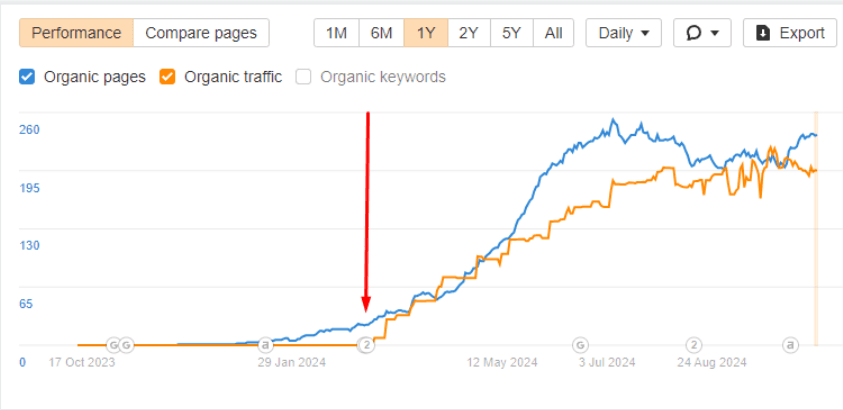
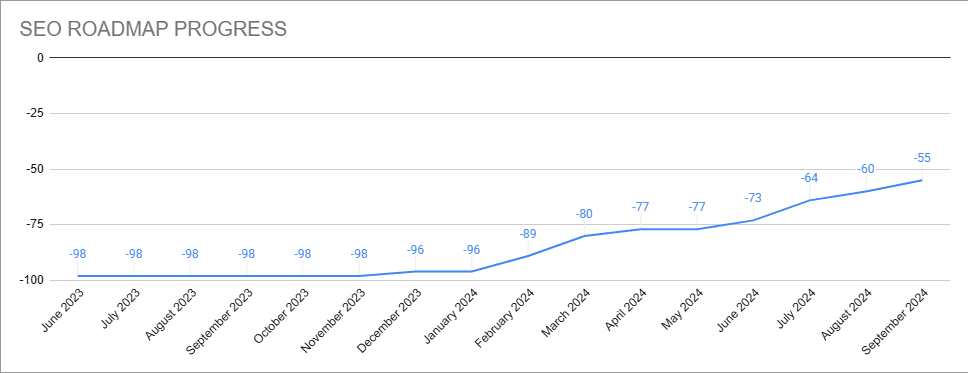
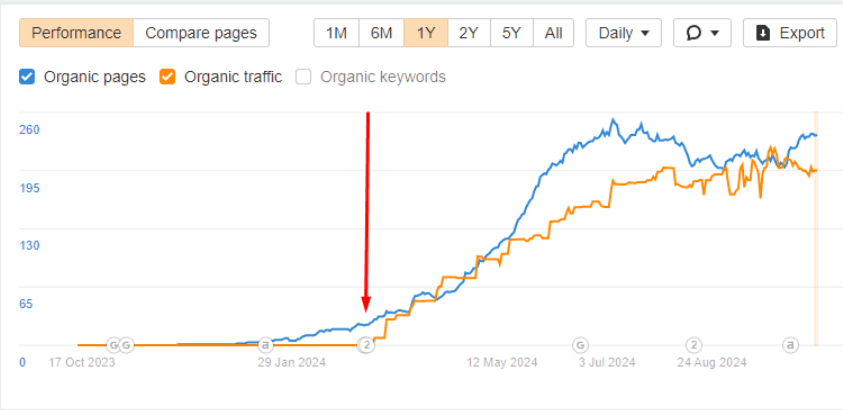
DeepLogic: organic pages and traffic after technical SEO roadmap
What I find on most sites
Three problems your crawl report won't show you
Every site has a crawl budget. On large sites, Googlebot burns through it on pagination, filter combinations, and parameter URLs it will never rank. Your core content gets crawled infrequently. New pages take weeks to get indexed. The crawl report shows nothing wrong.
When multiple pages target the same query, Google picks one to rank — rarely the one you'd choose. The others pull each other down. Cannibalization is invisible in a standard crawl but shows up immediately when you cross-reference ranking data the right way.
Topics are scattered across the site with no internal link logic connecting them. Pages that should reinforce each other have no relationship. Google sees isolated pages instead of a site with genuine depth on a subject. Topical clusters fix this — but most sites don't have them.
I don't just do Screaming Frog
Automated crawlers flag the obvious: broken links, missing tags, slow pages. I find the issues underneath those: the ones actually deciding whether your pages rank or disappear.
Your pages look indexable. Google disagrees. Crawl budget is being consumed by faceted navigation, filter combinations, or URL parameters, leaving your most important pages crawled infrequently or not at all. No crawl tool surfaces this without log file data.
PageRank is flowing to low-value pages while critical content sits deep in the site with minimal link equity. Invisible in a crawl report, devastating for rankings. I map exactly where authority concentrates and where it drains.
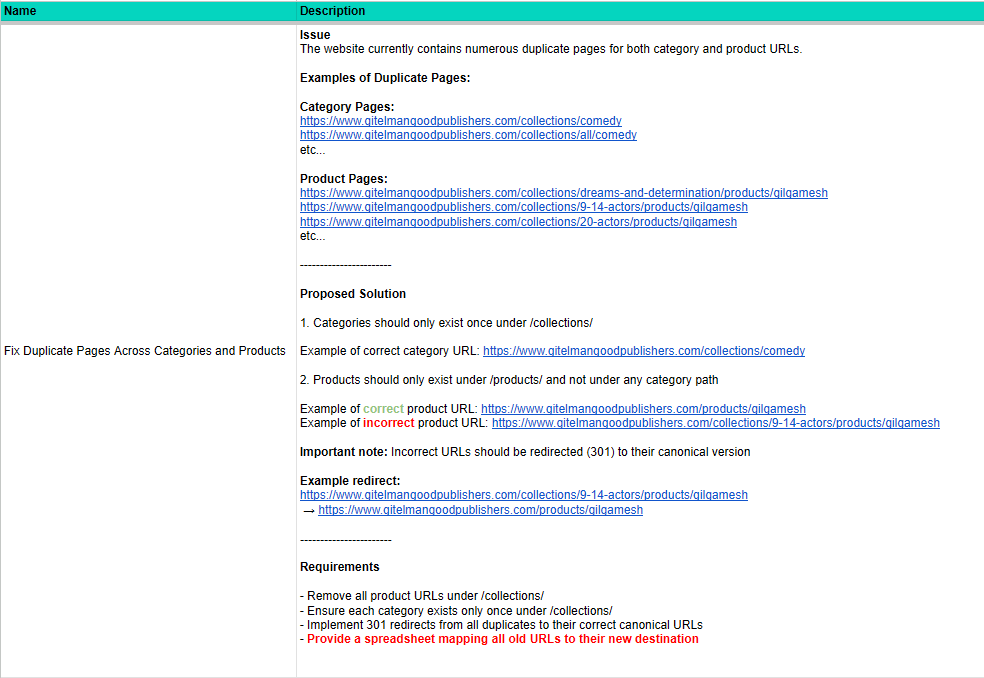
Large e-commerce stores and job platforms generate thousands of near-identical URLs through category paths, product filters, and location parameters. Google indexes the wrong versions, dilutes authority across duplicates, or stops crawling the section altogether.
Googlebot renders JavaScript partially or not at all. Content that looks perfect in the browser may be completely invisible to crawlers, particularly on React and Vue-built sites where critical elements are rendered client-side.
Screaming Frog simulates a crawl. Log file analysis shows what Googlebot actually did: which pages it crawled, how often, which it skipped, and where it timed out. The difference between these two datasets is where the real problems hide.
Pages with no internal link path from the homepage. Google discovers them occasionally through sitemaps but never assigns meaningful authority. They exist in the index but never rank. No crawler report tells you why.
How I go further than the standard audit
How I approach the audit
Every engagement starts from scratch. I don't apply a generic checklist. I map the specific failure points on your site before building a fix plan that your development team can execute.
Crawl & Log File Analysis
I run a full crawl alongside server log analysis to see what Googlebot actually visited, how often, and what it skipped — not what it should have done in theory.
Site Architecture Review
I map how URLs are structured, how deep key pages sit, and where internal link equity is concentrating — including orphaned sections with no crawl path from the homepage.
Indexability & Crawl Budget
I identify which URL patterns are consuming crawl budget without contributing to rankings, then build a plan to redirect Googlebot toward pages that matter.
Duplicate & Thin Content
I surface the near-identical pages generated by filters, pagination, and parameter combinations that Google has either ignored or indexed in the wrong version.
Technical Infrastructure
I audit rendering, page speed, schema markup, and redirect integrity — with a focus on issues that directly affect how Google processes and ranks your pages.
Roadmap & Ticket Delivery
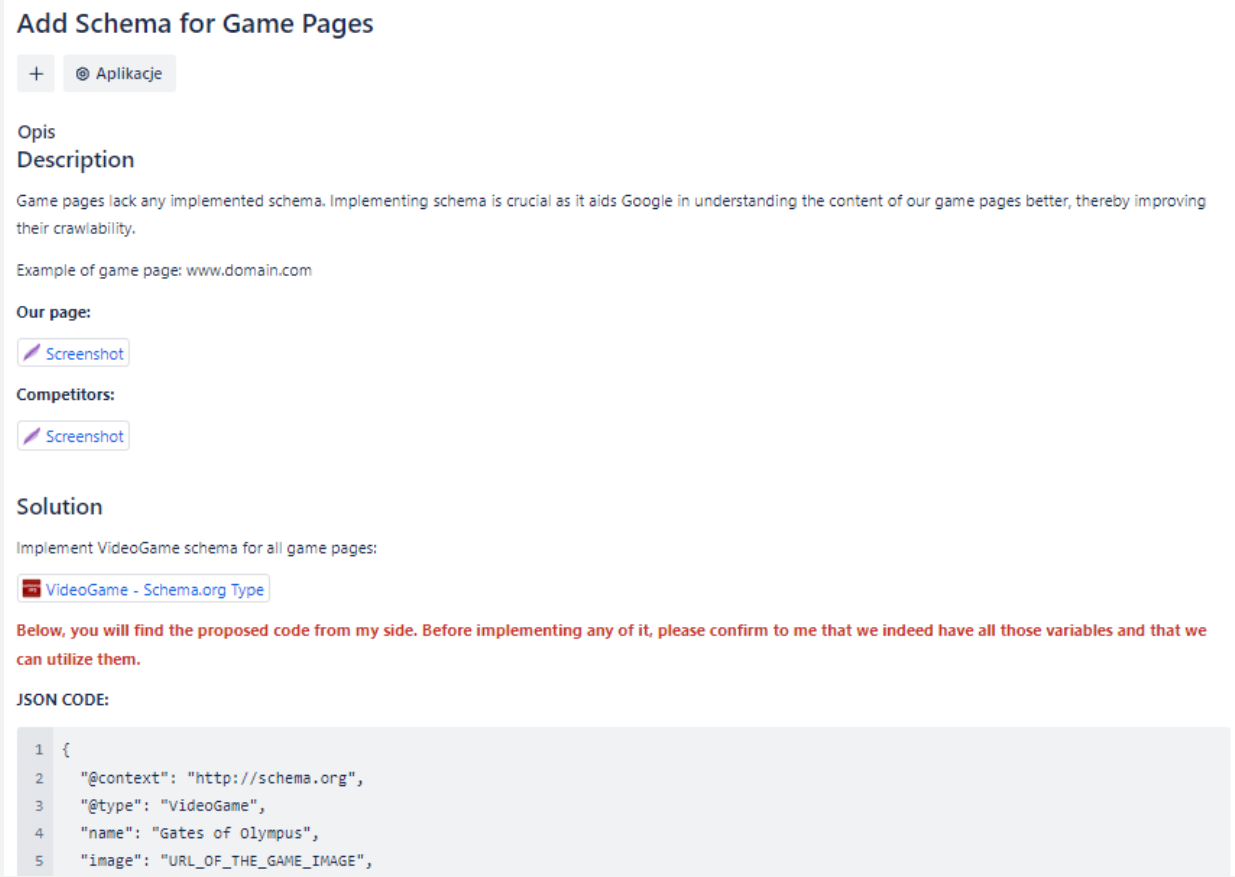
Every finding becomes a prioritized ticket ready for your development team, with the problem, solution, and implementation requirements written out in full.
What you actually receive
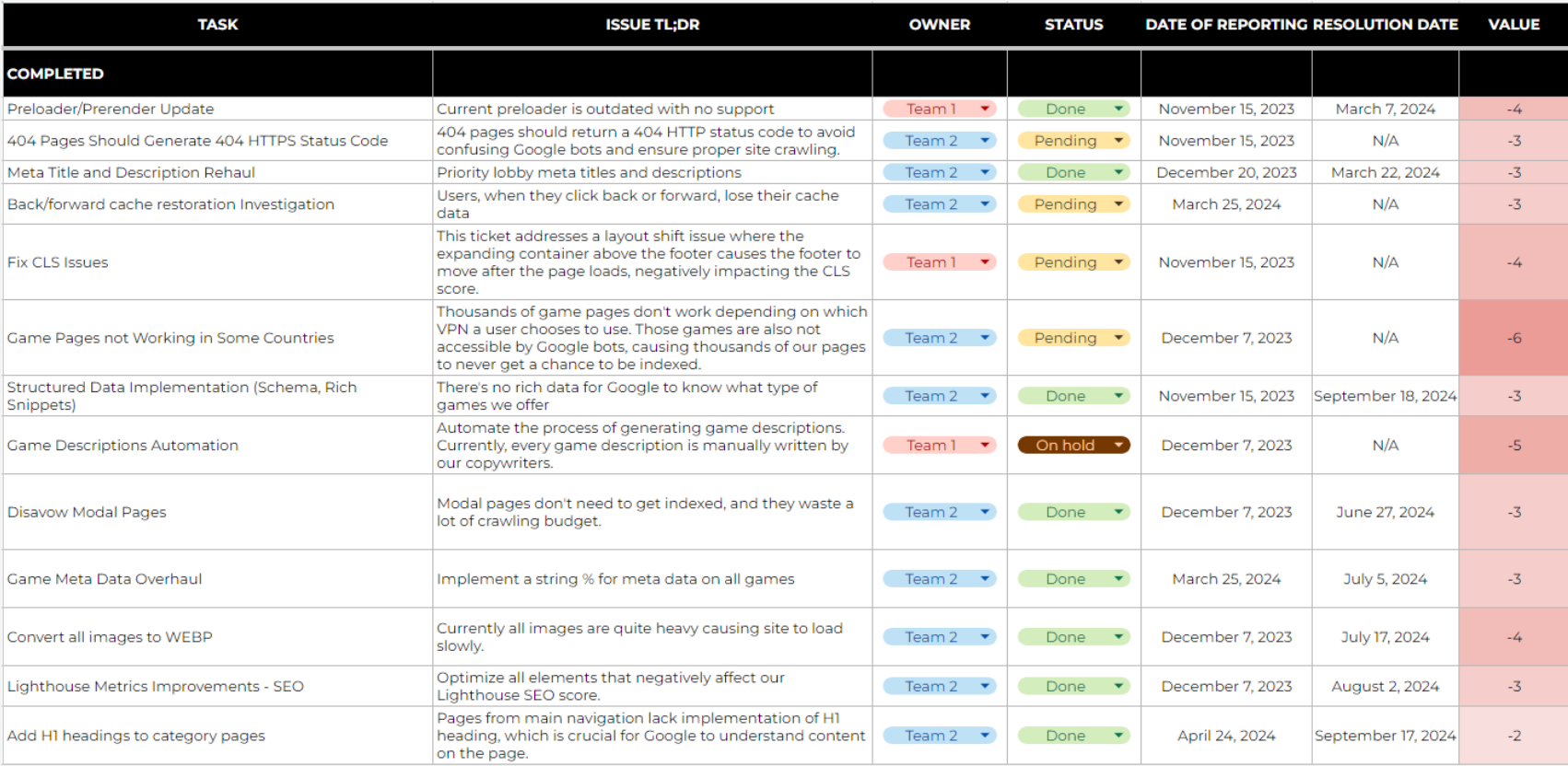
Not a PDF with generic recommendations. A structured roadmap and developer-ready tickets your team can implement without spending hours interpreting what the findings mean.
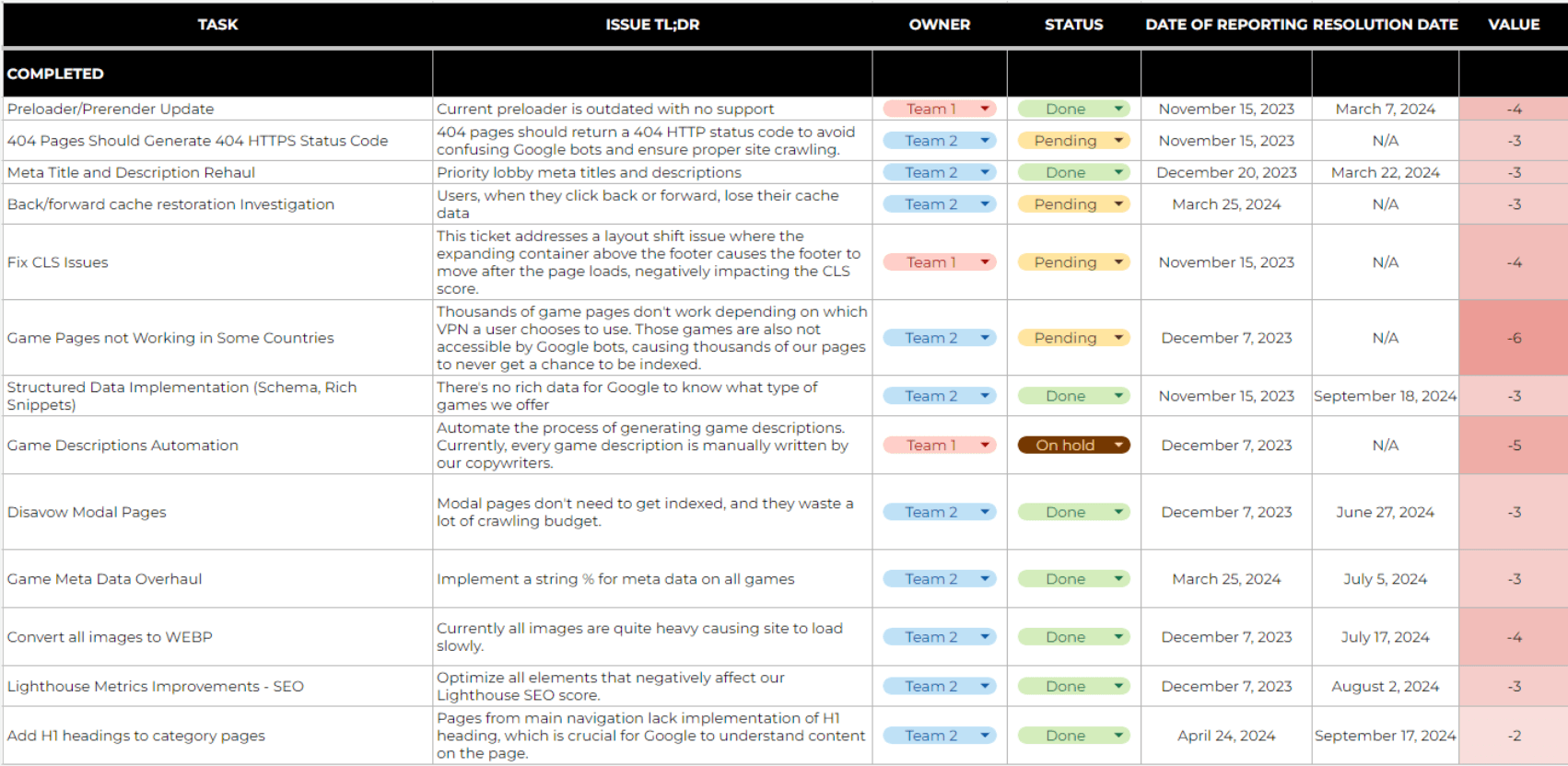
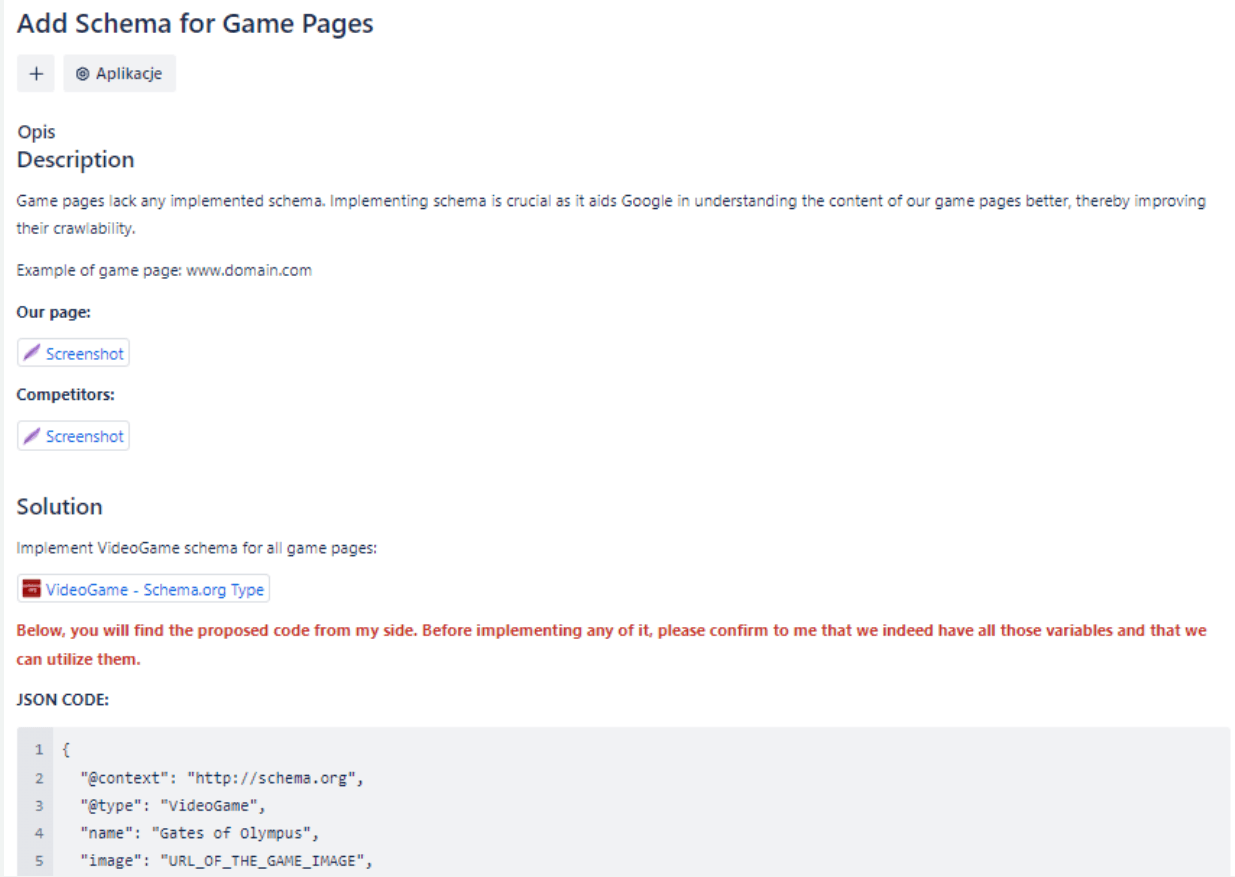
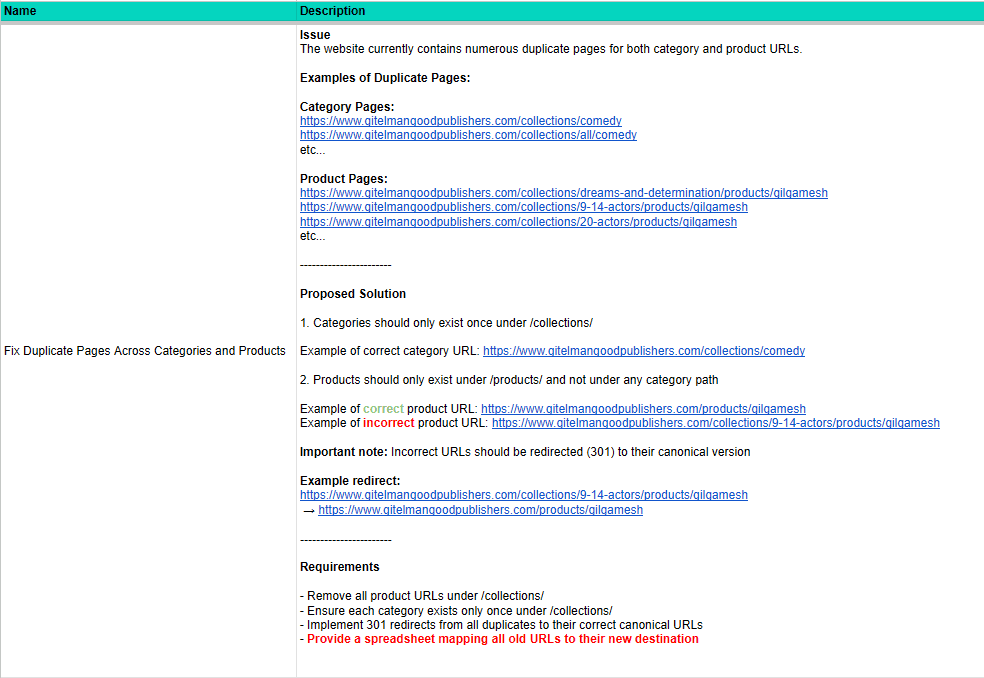
Deliverables included
Case studies: real results
Two different sites. Two different root causes. Both resolved with the same approach: find what's actually broken, fix it in the right order, and track the results.
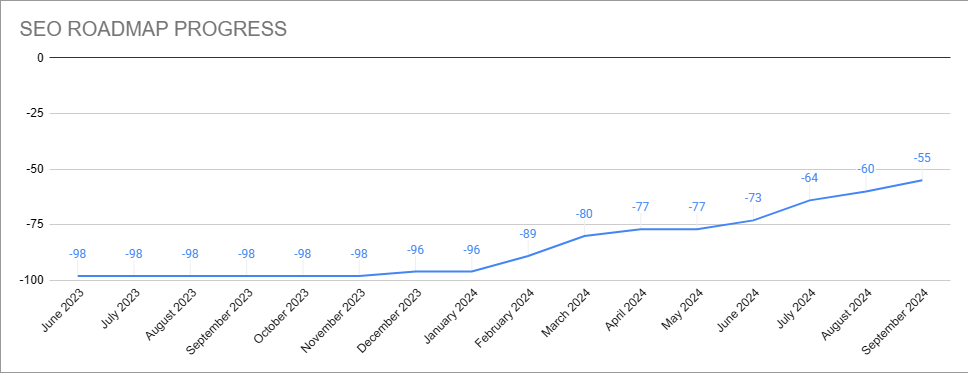
Technical SEO Roadmap Across Multiple Brands: 45+ Tickets, Significant Indexation Increase
DeepLogic's websites weren't being properly crawled by Googlebot. Certain brands faced recurring penalties in specific countries. Key pages weren't being indexed, and there was no structured process for identifying or fixing technical issues at scale.
Built a comprehensive technical SEO roadmap across all brands and platforms. Starting with global metadata generation, followed by broken page resolution, site structure improvements, and Core Web Vitals fixes. Over 45 technical tickets created with full implementation specifications for the development team.
Significant increase in indexed pages across the targeted brand. Organic traffic grew alongside improved crawl coverage. The structured roadmap protected sites from future penalties and gave the team a repeatable process for ongoing technical health.
Crawl Budget Optimization: 500,000 → 50,000 Daily Requests, Ranking Growth Across the Entire Site
A large job platform was receiving 500,000 daily crawl requests from Googlebot. The site's architecture was generating millions of near-duplicate URLs through job category combinations, location parameters, and filter variants, consuming crawl budget while leaving the most important listing pages crawled infrequently.
Conducted full log file analysis to map exactly which URL patterns Googlebot was hitting and how often. Used big data tooling to process crawl data at scale, identifying the parameter combinations driving the most waste. Restructured crawl directives, consolidated duplicate URL variants, and rebuilt the internal linking architecture to concentrate crawl equity on pages that matter.
Daily crawl requests dropped 90%, from 500,000 to 50,000. With Googlebot now focused on the right pages, the platform saw a significant uptake in rankings across the entire site, including substantial growth in TOP 3 keyword positions.

Technical issues I find and fix
From the common problems every audit catches, to the architectural failures most consultants never look for.
Who this service is for
Technical SEO has the highest impact on sites where scale creates complexity. If your site generates URLs dynamically or has grown without systematic technical maintenance, the issues are likely significant and invisible in standard reports.
Frequently asked questions
What does a technical SEO audit actually cover?
How is your approach different from running a crawler report?
What is crawl budget and why does it matter?
How do you work with large-scale data in SEO audits?
What are the deliverables after an audit?
Do you work directly with the development team?
Ready to fix what's actually holding your rankings back?
Book a free consultation. I will review your site, identify the highest-impact technical issues, and outline exactly what needs to be fixed, and in what order.